
Where a Small Google Ads Budget Actually Goes
If your Google Ads account is spending money and you cannot say with confidence what it is buying, the waste is almost always hiding in one of three places: search terms nobody meant to target, keyword match types reaching wider than intended, and automated bidding or Performance Max settings spending toward a goal nobody explicitly set. None of these show up as a single line item on your dashboard. You have to go and look for them, in a specific order, or you will spend a week guessing.
This is a practical framework, not an audit of a specific advertising account. The examples are illustrative and should not be read as measured client results. It is drawn from Google’s own account documentation and organized into the order that actually matters for a small budget. If a number cannot be sourced to Google’s own documentation with a date, it does not appear here.
What “wasted” actually means on a small account

Before checking anything, it helps to be precise about what counts as waste, because the wrong number gets chased constantly.
Low click-through rate is not waste. It might mean the ad copy is weak, but a low CTR on relevant traffic is a copywriting problem, not spend leaking out of the account.
High impressions with low clicks are not waste either. Impressions are free. Nothing has been spent until someone clicks.
Waste is a click you paid for that had no realistic chance of becoming a customer. That is the definition this article works from: money spent on a search term, an audience, or a placement that was never going to convert, regardless of how good the landing page or the offer is. Cluster 4 of this site covers what happens after the click; this cluster is about whether the click should have happened at all.
The three places waste actually hides

1. Search terms nobody meant to target
Every keyword you add, even on tighter match types, can still trigger on searches you did not anticipate. The search terms report is the account’s own record of exactly which real-world queries triggered your ads, and it is the single most direct place to find this category of waste: not a third-party tool, but the report Google Ads already keeps for you.
2. Match type creep
Broad match, in particular, is built to reach beyond the literal keyword you entered. According to Google’s own documentation, broad match “looks at additional signals in your account to match more relevant traffic, including landing pages, keywords in your ad group, previous searches, and more” (Google Ads Help, checked 2026-07-29). That is a deliberate design choice, not a bug, but on a small account without a tight negative keyword list, it is the most common single source of spend on unrelated searches. What each match type actually reaches in 2026 covers this in depth.
3. Automated bidding and Performance Max spending toward the wrong signal
Smart Bidding strategies and Performance Max campaigns optimize toward whatever conversion action and audience signal you have given them. If the conversion action is set up loosely, or the audience signals are thin, the automation will spend confidently toward the wrong outcome, doing exactly what it was told, which is the problem. This mechanism deserves its own article and is not repeated here; the point for this pillar is that automated spend is not “hands-off waste-free spend.” It still needs the same conversion setup and negative-keyword discipline as manual campaigns.
The three places, side by side

| Waste source | Where it shows up | The deep dive that covers the fix |
|---|---|---|
| Search terms nobody meant to target | The search terms report, as cost on rows with zero conversions | How to Read the Search Terms Report Without Drowning in It |
| Match type reaching wider than intended | Broad or phrase-matched keywords triggering on loosely related queries | Broad, Phrase and Exact Match in 2026 |
| Automated bidding or Performance Max spending toward the wrong signal | Steady spend with a conversion action that was never tightened, or thin audience signals | Covered later in this cluster |
The order to check these in, this week
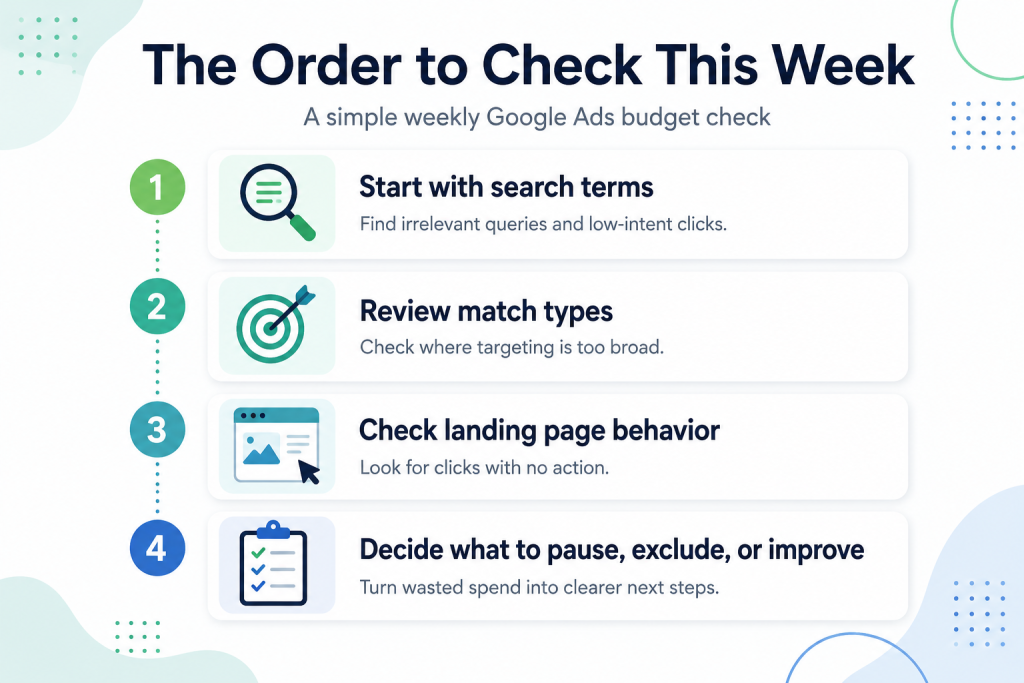
Agencies selling audits tend to present all of this as one undifferentiated list. On a small account with limited time, the order matters:
- Start with the search terms report. It shows you what actually happened, not what could theoretically happen. See how to read it without drowning in the row count.
- Pull your first negative keywords from what you found there. Do not paste in a generic industry negative list; build the first pass from your own account’s actual search terms. See building the first list that saves money.
- Check whether match type is the reason irrelevant terms keep appearing, even after you add negatives. See why your ad shows for searches you never targeted.
- Only then look at bidding strategy and Performance Max settings, because if the search terms and match types underneath them are already leaking, fixing the bidding strategy on top of a leaking foundation just automates the waste faster.
Change one thing at a time
This is worth stating plainly rather than assuming it: every fix described in this cluster affects real spend in a live account. Adding negative keywords can suppress real buyers if the list is too broad. Tightening match types can also tighten your reach more than intended. Change one variable, wait long enough to see the effect on your own account’s traffic, and only then make the next change. Nothing here is presented as a change with no downside.
Deep dives in this cluster
- How to Read the Search Terms Report Without Drowning in It
- Negative Keywords: Building the First List That Actually Saves Money
- Broad, Phrase and Exact Match in 2026: What Each One Really Buys You
- Why Your Ad Shows for Searches You Never Targeted
FAQ
Is all wasted spend avoidable?
No. Some proportion of clicks on any campaign will not convert; that is normal variance, not waste. The goal is removing spend on searches, audiences, or placements that had no realistic chance of converting, not driving waste to zero.
Do I need a tool to find this, or can I do it inside Google Ads?
Everything in this pillar and its four deep dives uses reports and settings that already exist inside your Google Ads account. No third-party tool is required to do this first pass.
How often should I check for this kind of waste?
There is no single correct cadence that fits every account size and budget; the practical answer is to check the search terms report on a schedule you can actually keep, and treat a widening gap between spend and conversions as the signal to check sooner.
Will fixing this guarantee lower cost or more conversions?
No outcome is guaranteed. Removing spend that was never going to convert redirects budget toward traffic that has a better chance, but a small account’s total result also depends on the offer, the landing page and the market, covered elsewhere on this site.
Where do I start if I have never looked at any of this before?
Start with the search terms report. It is the most concrete evidence of what your account is actually doing, and every other fix in this cluster works from what you find there.
Checked against Google Ads’ own product documentation on 2026-07-29. Ad platform behavior changes; if you are reading this more than a few months after that date, verify current mechanics directly in your account and in Google’s help center before acting.